
Cookie settings

Choose what you accept. You can change it whenever you like from “Cookie settings”, at the foot of any page.

Technical

Always on

They make the site work and remember what you choose here (cookie kx_consent, 12 months). They can’t be turned off.

Measurement (Microsoft Clarity)

Heatmaps and anonymous recordings of how the site is used (where people tap, how far they scroll), to improve it. What you type into forms is never recorded. Cookies _clck (12 months) and _clsk (1 day).

Advertising (Meta)

Meta’s pixel and its cookies _fbp and _fbc (90 days) tell us which Facebook and Instagram ads bring visits, demos and contacts. If you also send us a form, we tell Meta from our server, with your email and phone number turned into an irreversible code (a hash).

All the detail is in the cookie policy (in Spanish).

Koxium Invoices

Invoices pile up. Your accountant’s waiting.

Take a photo of the invoice: Koxium reads it, checks the tax ID and the VAT and gets it ready for your accountant. All you do is review and approve.

  • Free and no card, in a minute
  • From €19 a month, no lock-in

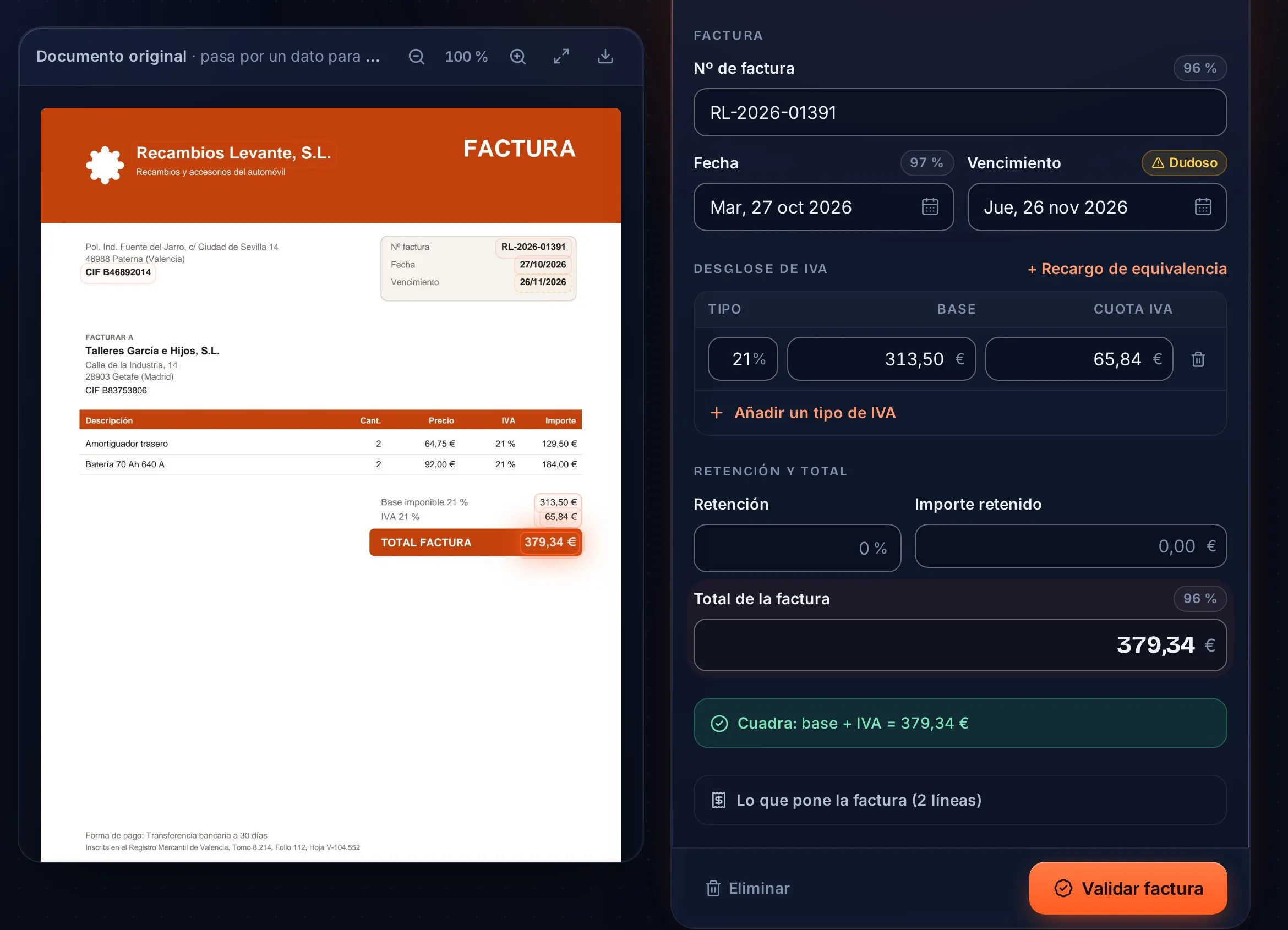
Animated example: Koxi reads an invoice from Recambios Levante, S.L. and pulls out the supplier, the tax ID, the number, the date, the net amount, the VAT and the total; she checks that the net amount plus the VAT make the total and leaves it ready for a person to validate.

Example invoice from the Taller García demo

Sound familiar?

Every quarter, the same story.

  • A box of invoices, and typing them in at night.

    It costs you: hours after closing that nobody pays you for.

  • Your accountant, asking for them every quarter.

    It costs you: a last-minute hunt for the one that’s missing.

  • Worrying you’ll get the VAT wrong.

    It costs you: one mistyped number and the quarter no longer adds up.

How it works

Leaving your books to a machine is scary. That’s why nothing gets in on its own.

Koxi reads and you decide: nothing counts towards your quarter until you approve it.

  1. You take a photo

    Or upload the PDF, several at once: the invoices you receive and the ones you issue with your own software.

  2. Koxi reads it and checks it

    The tax ID, the net amount, the VAT and the total. If something doesn’t add up or looks like a duplicate, she flags it.

  3. You approve it, and it’s ready for your accountant

    Each invoice goes into its VAT book and its quarter. You export what you’ve approved as Excel, CSV or Contasol.

Reviewing an invoice in Koxium: the document on the left, with the total lit up, and on the right what Koxi read, with one detail marked “Dudoso” (doubtful), “Cuadra: base + IVA = 379,34 €” (it adds up) and the “Validar factura” (validate) button.
See it for real.The app, in Spanish, with an example invoice from the demo

And delivery notes

What arrived, against what you’re billed.

So you never pay for what didn’t arrive, or at another price. Without going through paperwork at the end of the month.

  • You take a photo of the delivery note when the order arrives. Koxi reads the supplier, the number, the date and every line, with or without prices.
  • When the invoice arrives, Koxi finds the delivery notes it bills: by the number it quotes or, if it quotes none, by the amounts. You confirm it.
  • It compares, line by line, what arrived with what you are billed, and flags every difference: the quantity, the price, or something billed that never arrived.
  • You see what hasn’t been billed yet, supplier by supplier, and export it for your accountant in Excel or CSV.

A delivery note doesn’t go to the tax office or count in the quarter: it’s there to check you pay for what arrived. Its pages count like invoice pages.

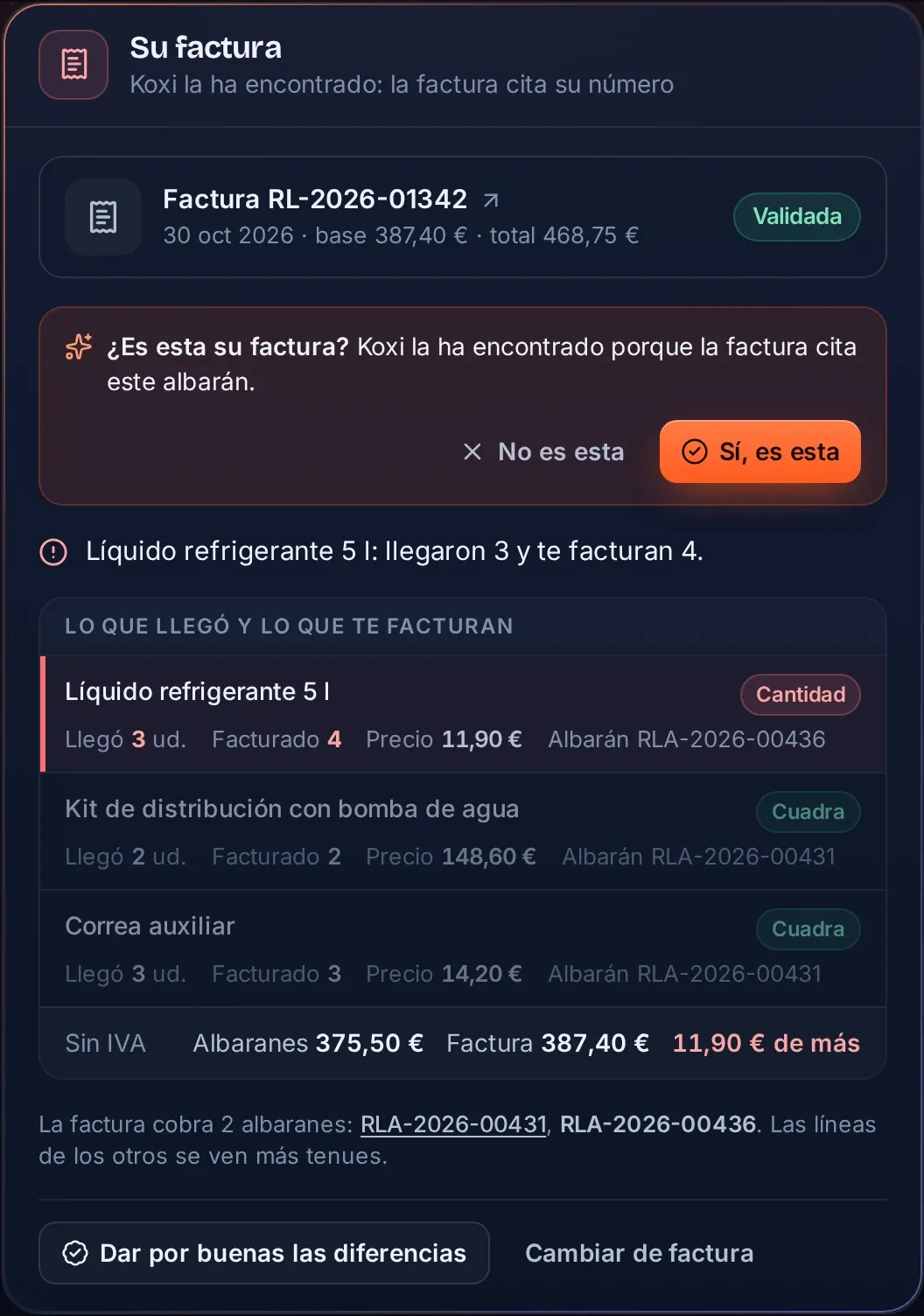
A delivery note in a garage demo: Koxi found its invoice because the invoice quotes it, and the line-by-line comparison flags a difference: 3 units of coolant arrived and 4 are billed.
Example: a garage demo, with sample data

And for invoicing

Your invoices go out from here. And reach the tax office.

It takes a minute, or comes straight from the accepted quote, and goes into your book of issued invoices.

  • Numbered in order, with no gaps, and its PDF with the QR code that lets anyone check it with the tax office.
  • Every invoice leaves its Verifactu record, chained to the one before, and one click checks the whole chain.
  • A mistake? A corrective invoice or a cancellation, without touching the original.
  • Issuing them from Koxium and sending them to the tax office, with Verifactu or through the SII.Coming soon

In the demo you can see it all working, the tax office’s reply included, as a simulation.

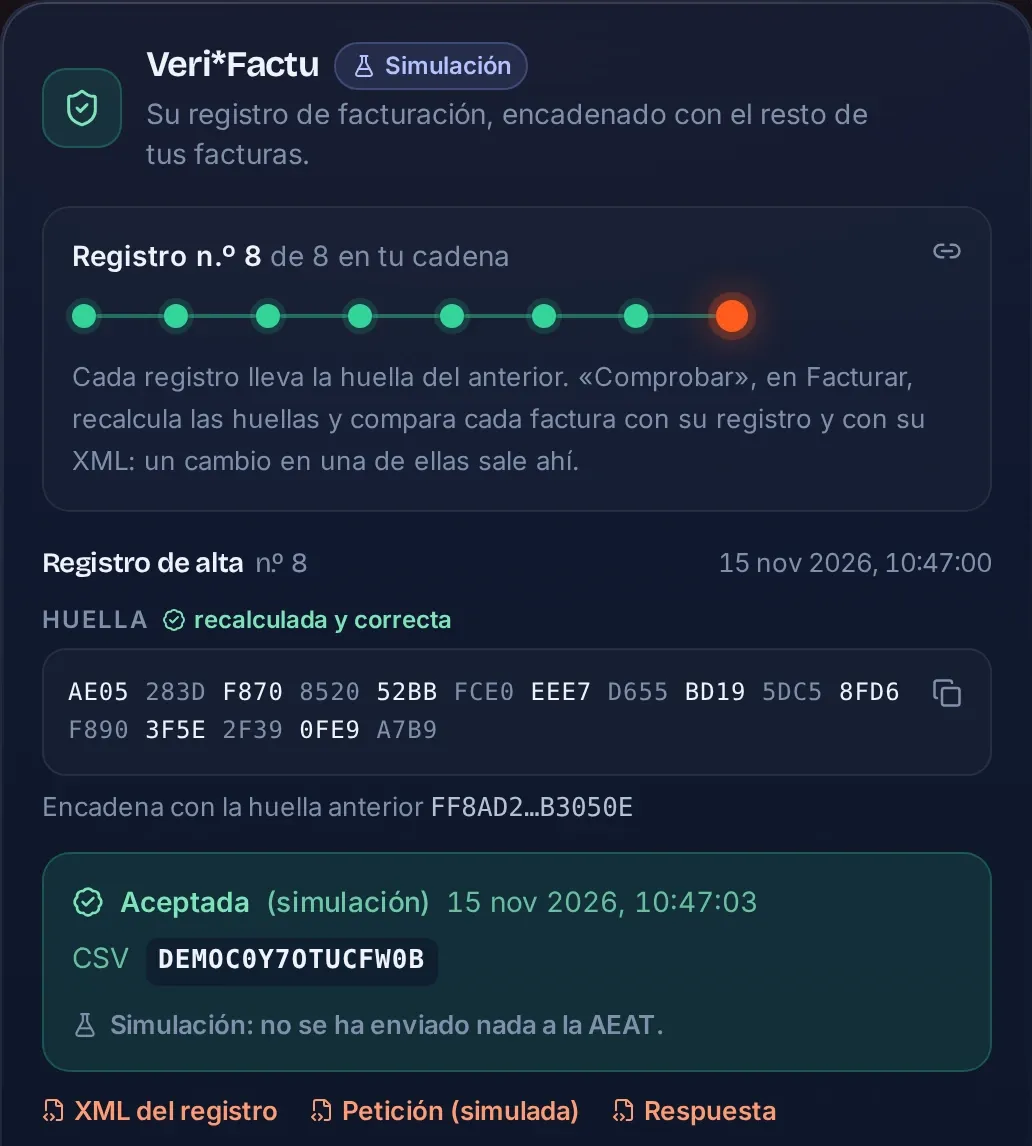
The Verifactu record of an invoice in a garage demo: number 8 of 8 in its chain, its hash recalculated and correct, chained to the previous one, and the tax office’s answer, simulated.
Example: a garage demo, simulated

SII or Verifactu?

One or the other, never both. Koxium has both routes.

They’re the two ways your invoices reach the tax office. Which one is yours depends on your business.

SII

Immediate Supply of Information

Who
Required if you turn over more than €6 million a year, if you’re on the monthly VAT refund register (REDEME) or in a VAT group. Optional for everyone else.
What
You send the tax office your VAT books, issued and received, within 4 working days.

Verifactu

Verifiable invoices

Who
Everyone else who invoices with software: companies and self-employed people who aren’t in the SII.
What
Only the ones you issue. Each carries a chained record and a QR code and, in VERI*FACTU mode, goes to the tax office straight away.

The ones you receive

Invoices from your suppliers.

  1. Photo or PDF

    The supplier’s invoice, however it reaches you.

  2. Koxium reads it

    With OCR: the supplier, the tax ID, the net amount, the VAT and the total.

  3. It checks it

    The tax ID, the VAT and that the total adds up. Then you approve it.

  4. Into your VAT book

    The one for received invoices, each in its quarter.

  5. Excel · CSV · Contasol

    Ready for your accountant

    You export what you’ve approved, in their format.

    And if you’re in the SII

    SIIComing soon

    To the tax office too

    Your book of received invoices, through the SII.

The ones you issueComing soon

From Koxium. In the demo you can see it working, as a simulation.

  1. You make it in Koxium

    In a minute, or from the accepted quote.

  2. Chained record and QR code

    Each invoice carries the fingerprint of the one before and its own QR code.

  3. Into your VAT book

    The one for issued invoices, and ready for your accountant.

  4. VERI*FACTUComing soon

    To the tax office, straight away

    Invoice by invoice, as soon as you issue it.

    Or, if you’re in the SII

    SIIComing soon

    To the tax office through the SII

    Your book of issued invoices, within 4 working days.

It all adds up.Your VAT books, up to date and ready for your accountant.

Before you decide

Try it before you pay. And know what you’ll pay.

A demo with example invoices, free and with no card, in a minute. Then month to month, with no lock-in.

  • 50 pagesFor a handful of invoices a month.€19 a month
  • 150 pagesFor a business with regular suppliers.€39 a month
  • 400 pagesFor lots of suppliers and delivery notes.€79 a month

Excluding VAT, with no setup fee. Each extra page, €0.12. Or included in the Receptionist plans.Work out your price

  • You hand it to your accountant in their format (Excel, CSV or Contasol), with the invoices in a ZIP.
  • You don’t start alone: we set it up with you.
  • Coming soonIssuing your invoices from Koxium and sending them to the tax office, with Verifactu or through the SII.

Questions

What people ask about Invoices.

Still have a question? Write to us at hola@koxium.com and we’ll get back to you.

Does it replace my accountant?

No. It saves your accountant, and you, from typing invoices in: you send them read, checked and in their format. Your accountant still does the tax returns and the bookkeeping.

What if Koxi misreads something?

You correct it in the review, with the invoice alongside: hover over a detail and its place in the document lights up. Doubtful ones are marked and, if something doesn’t add up, “Validar” (validate) warns you first.

Does it read delivery notes too?

Yes. You take a photo of the delivery note when the order arrives and Koxi reads it. When the invoice arrives, she finds the delivery notes it bills, compares them line by line and tells you if something doesn’t match. You confirm each one. Their pages count like invoice pages.

What about my invoices’ privacy?

Each business only sees its own. They’re stored under a random name, only open through links that expire, and photos have their location removed before they’re saved. They’re read with Microsoft’s Azure AI Document Intelligence and, to check them, also by Anthropic’s AI (Claude, in the United States). Our privacy policy has the details.

What about Verifactu and the SII?

Verifactu is about how invoices are issued with software. Issuing them from Koxium, with their Verifactu record, is already built and you can see it working in the demo, as a simulation; for a real business it says “Coming soon”. Meanwhile, Koxium Invoices reads and records the ones you issue with your invoicing software. Sending them to the SII is the same: built and “Coming soon”.

Pilot programme

Book an Invoices demo.

We call you, show you Koxi reading invoices like yours and work out what your accountant needs.

  • No lock-in. Month to month, from €19 a month.

Tell us about your business

We’ll call or write to you on a working day. The demo and the app are in Spanish.

Sector